How to Make Your First GitHub Pull Request
What’s this about?
If you’ve never made a pull request (PR) on GitHub before, it can seem kind of intimidating. But it’s really not that bad once you’ve done it once. This post walks you through the whole process from start to finish.
Why pull requests matter
PRs are basically how developers propose changes to a codebase. Here’s why they’re a big deal:
- Code review: Other people get to look at your code before it gets merged. Catches bugs and keeps quality high.
- Teamwork: It’s the standard way teams collaborate on code. If you work with other devs, you’ll be making PRs constantly.
- Safety net: Nothing goes into the main branch without being reviewed first. That’s a good thing.
What you’ll need
Nothing crazy:
- A GitHub account (free).
- Basic knowledge of Git (clone, commit, push, branch). If those words mean nothing to you, look up a quick Git tutorial first.
- A repo you want to contribute to.
Let’s do it step by step
Step 1: Fork the repo
Go to the GitHub repo you want to contribute to and click the “Fork” button in the top right. This makes a copy of the repo under your account.
Step 2: Clone it to your machine
Open your terminal and run:
git clone https://github.com/your-username/repository-name.gitThis downloads the repo to your computer so you can work on it locally.
Step 3: Make a new branch
Go into the project folder and create a branch for your changes:
git checkout -b feature-or-fix-branchName it something descriptive. Like fix-typo-in-readme or add-dark-mode. Not just my-branch.
Step 4: Make your changes
Open the code in your editor, do your thing, and save. Whether it’s fixing a bug, adding a feature, or updating docs, just make sure your changes are clean and focused.
Step 5: Commit and push
Stage and commit your changes:
git add .git commit -m "Fix typo in README"Write a clear commit message. Future you (and other devs) will thank you.
Then push it up to your fork:
git push origin feature-or-fix-branchStep 6: Open the pull request
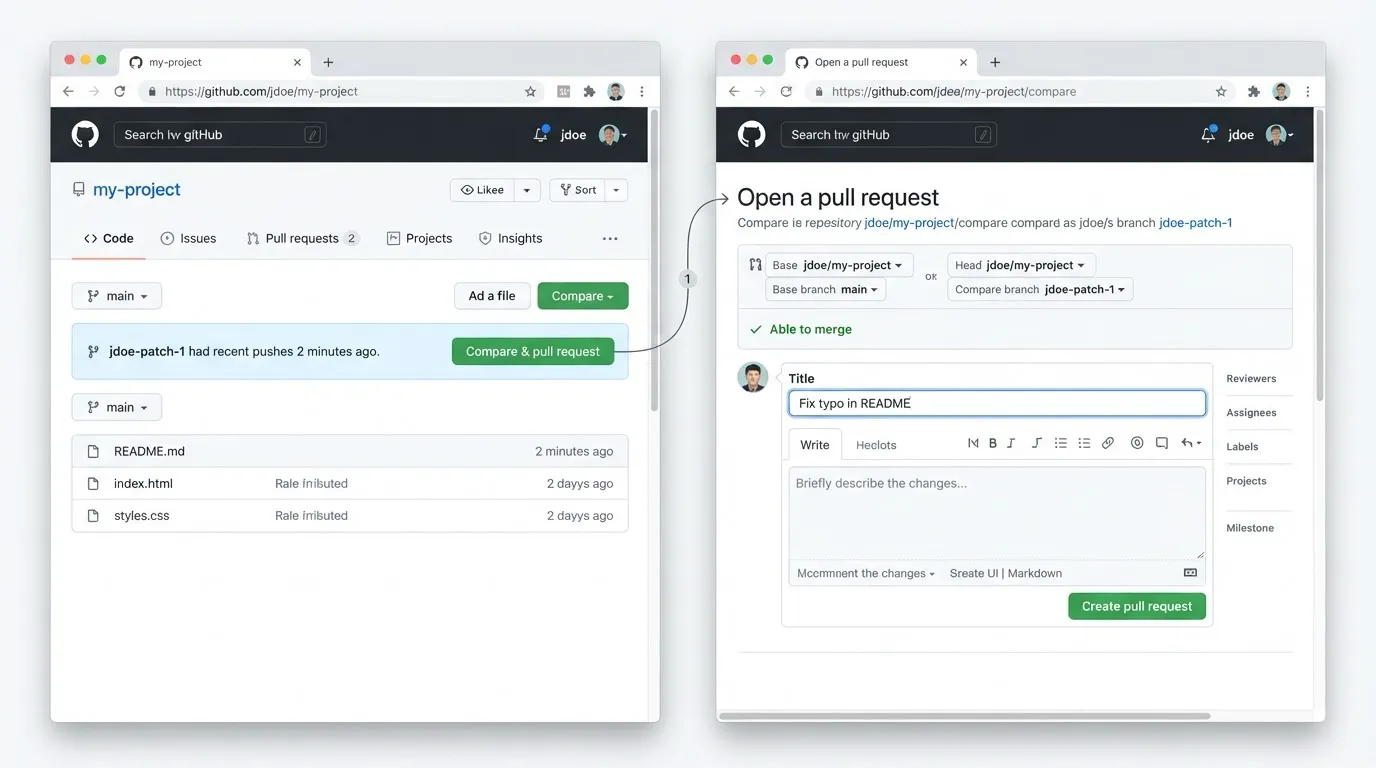
Go back to the original repo on GitHub. You should see a banner saying you recently pushed a branch. Click “Compare & pull request.”
Fill out the PR form. Explain what you changed and why. If there’s a related issue, mention it. Then hit “Create pull request.”
That’s literally it.
You did it
Your first PR is out there. The maintainers will review it, maybe leave some comments or ask for changes, and eventually (hopefully) merge it. Don’t stress if they ask you to tweak something, that’s normal and it’s how you learn.
Now go find another repo and do it again. The more you contribute, the more comfortable it gets. Happy coding!